ok tumblr decided to make this a feature for some reason and ppl seem to use it fine on ios but im a primarily desktop bitch so heres how to do this shit on desktop the convoluted and stupid way.
when u go to make a new post, click on the cogwheel and change the text editor from rich text to HTML like this:
so far there are 7 different colours u can use: Red, Orange, Yellow, Green, Blue, Purple, and Pink
the span tag for the colours are in this box here:
<span class="npf_color_joey">this is red</span>

<span class="npf_color_monica">this is orange</span>

<span class="npf_color_phoebe">this is yellow</span>

<span class="npf_color_ross">this is green</span>

<span class="npf_color_rachel">this is blue</span>

<span class="npf_color_chandler">this is purple</span>

<span class="npf_color_niles">this is pink</span>
copy the tag for the colour you want, paste it into your HTML editor, and add your text in between the angle brackets where it says “this is (text colour)”
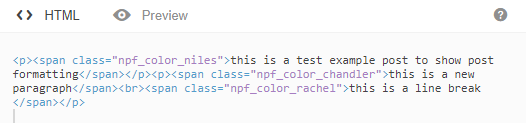
since this is HTML, you might want to write your post first and then change the text editor to HTML. otherwise, you will have to format your post in HTML, like this:
when posted, it looks like this:
<p></p> indicates a paragraph, <br> is a line break. otherwise, your text will be in one big chunk.



 glubglubshrg tumblr